All your trading.All your investments.One platform.
Invest, journal, copy, practice and improve with TradeEngine. A complete ecosystem. One subscription.
A complete ecosystem
9 tools. One app.
A portfolio here, a journal there, another tool to practice with. TradeEngine brings it all into a single workspace. Take a look.
01Investment portfolio
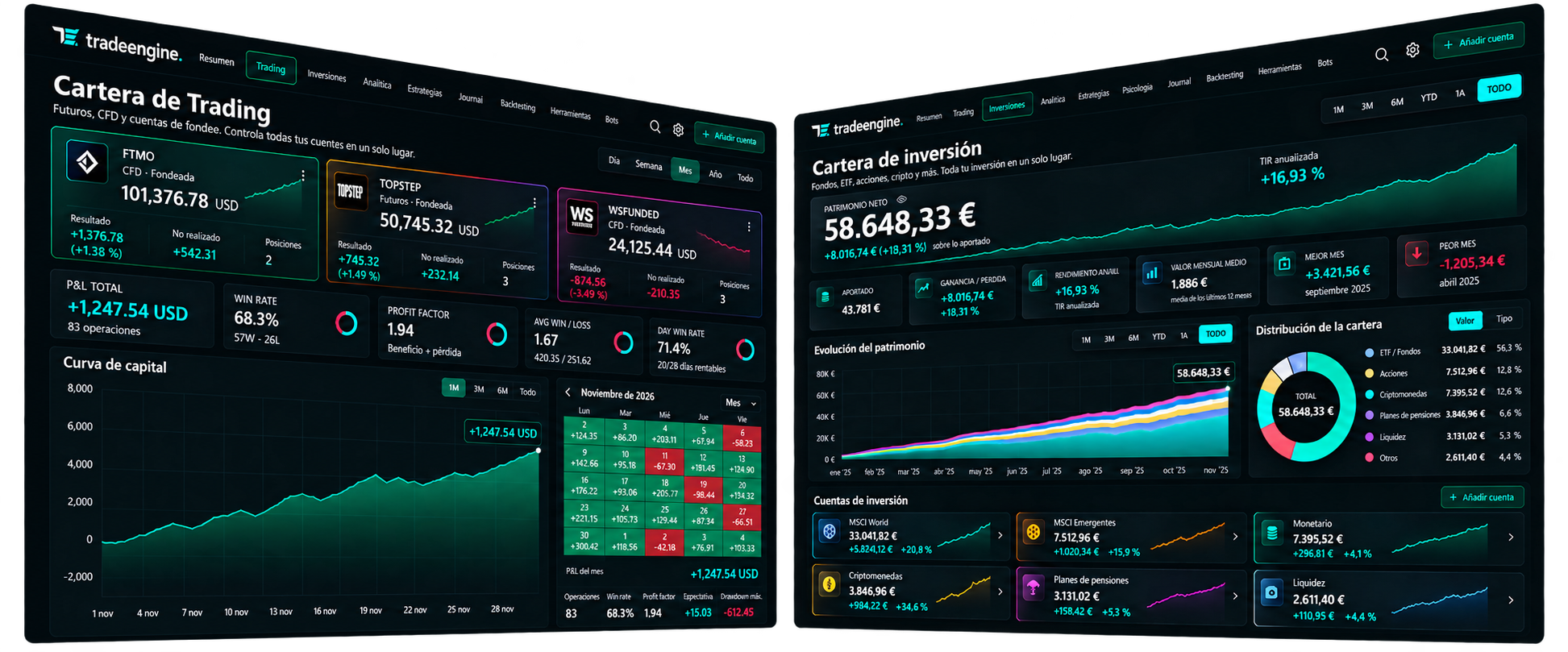
Your wealth, complete and in view.
Record your purchases of stocks, ETFs, funds and crypto. Track their value with public prices, plus your portfolio's returns and allocation, right next to your trading workspace.
- Stocks, ETFs, funds and crypto in one portfolio
- Valued with public prices
- Returns and allocation by asset type
Purchases are recorded manually. It does not place investment orders.
04Backtesting · Market Replay
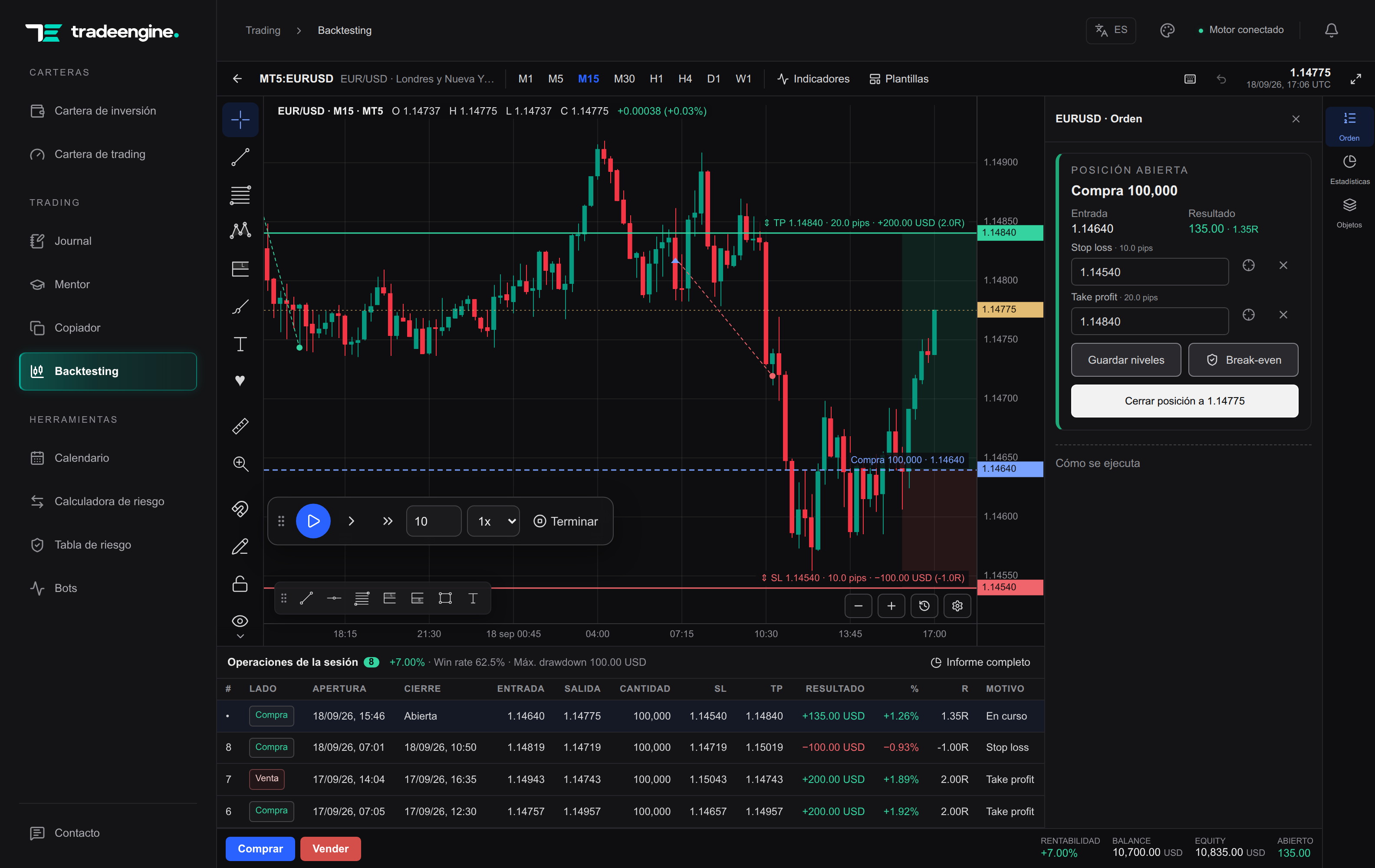
Train your strategy candle by candle.
Turn an idea into a practice session. Step through history, draw your scenarios and trade with stop loss and take profit on the chart. Each session keeps its own trades and statistics, separate from your live trading.
- Candle by candle, from M1 to W1
- Indicators and drawing tools
- Statistics for every session
05Trading psychology + Mentor
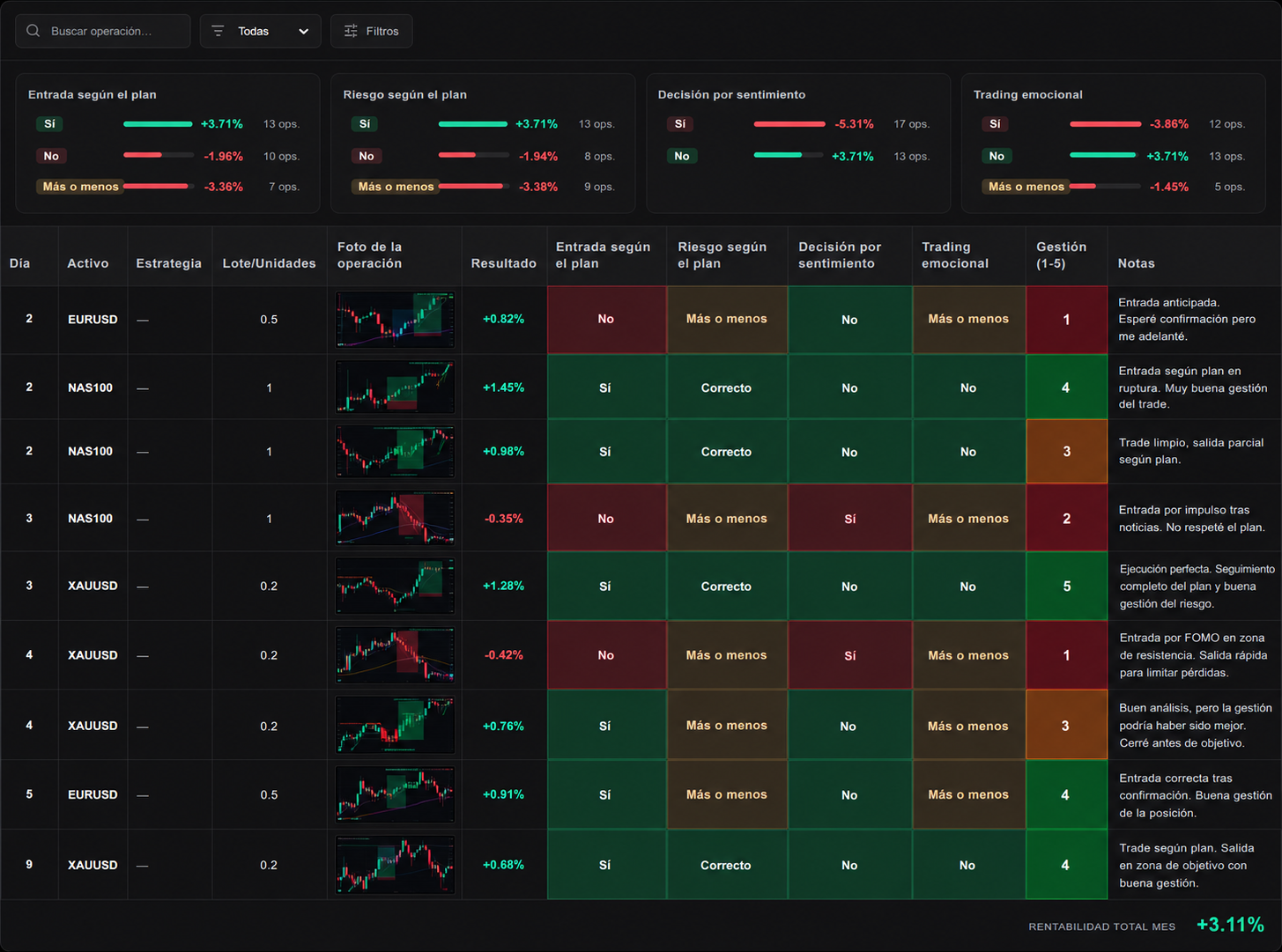
Master your mind. Improve your decisions.
FOMO, the urge to win back a loss or overconfidence pull you away from your plan. Log how you traded, compare your decisions in Mentor and export your journal to Excel or CSV.
Emotional trading · Did it affect the trade?
- “No” · 13 trades
- +3.71%
- “Yes” · 12 trades
- −3.86%
Sample data: 30 fictitious trades, another 5 marked “Somewhat”. Each trade's percentage is added up, as in Mentor; this is not a portfolio return.
06Economic calendar
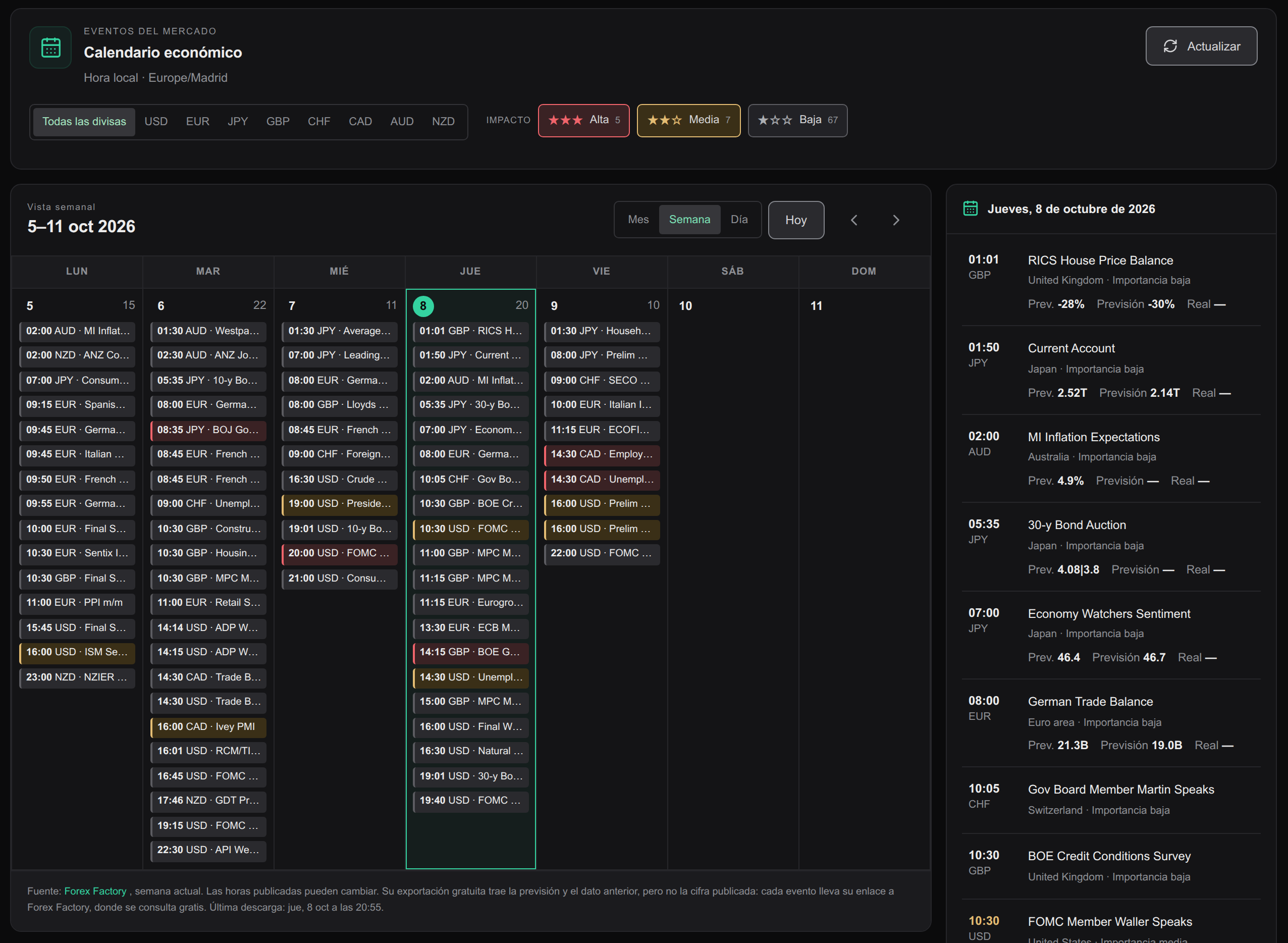
Don't let the news catch you off guard.
Jobs, inflation, rate decisions or Fed minutes: keep the events that move your market in view and prepare every session knowing when volatility may hit.
- Every release in your local time
- Filters by currency and high, medium or low impact
- Previous figure and forecast for every event
- Month, week or day view
Local sync with MT5, MT4 and cTrader. For other platforms, import CSV, XLSX or JSON files in the supported formats.
Local architecture · Funded accounts
Your IP stays yours.No foreign IPs at your prop firm.
TradeEngine syncs your journal inside your computer, straight from your terminal. No external server ever logs in to your account: your broker and your prop firm only see your usual connection, which is yours.
- third-party IPs on your account
- 0
- servers connected to your broker
- 0
- of the sync happens on your PC
- 100%
How your trades travel
Your computer · Windows
Your IPLocal sync: your trades never leave your machine
Broker / Prop firm
Only logs your terminal's connection
External server
No server connects to your account
Cloud-connected journal
TradeEngine
Who connects to your account
In the cloud: The journal's servers
With TradeEngine: Only your terminal
IP your prop firm records
In the cloud: Their servers' IPs too
With TradeEngine: Yours, as always
Investor password
In the cloud: You hand it to a third party
With TradeEngine: Not needed
Where your history lives
In the cloud: In their cloud
With TradeEngine: On your computer
For FTMO and other prop firms
Log and analyze every trade without logins from servers in other countries or IPs shared with other users. Your funded account only sees your own terminal's connection.
This refers to journal syncing. Each prop firm's rules (EAs, copiers, news trading…) still apply to your account. Your TradeEngine account, subscription and license are managed online; your journal history stays on your PC.
One subscription. The whole ecosystem.
All your trading. All your investments. One platform.
Choose where to start. The rest of the ecosystem is already with you.
€12.99/ month
or €99.90 a year (−36%) · Cancel anytime
- Every tool
- Up to 2 Windows computers
- Updates included
- No commitment
Secure payment handled by Paddle. If you cancel, you keep access until the end of the paid period.
FAQ
Frequently asked questions
Still have questions? Read the user guide or email us at support@tradeengine.pro.
Do I need to share my broker password?+
No. With MetaTrader, a small script you install in your own terminal hands your history to the app on the same computer. For other platforms, you import the statement you export yourself.
Does the journal add an external IP to my FTMO or other prop firm account?+
No. Syncing happens inside your computer: no TradeEngine server logs in to your broker, so your account only records your own terminal's connection, with your usual IP. Each prop firm's terms of use still apply to your account.
Are my trades uploaded to any server?+
No. Your journal, notes and screenshots are stored on your PC. Our servers only handle your account, your subscription and the computers where you use TradeEngine.
What's the difference between the journal and the copier?+
The journal records and analyzes your trades. The copier replicates trades between your own MT5 accounts once you set it up and authorize execution. Check your broker's or prop firm's conditions before enabling it.
Does it work for prop firms?+
Yes. Set up your challenge rules (profit target, daily and overall loss, minimum days, consistency) and track your progress. The projection estimates how often you would hit the target with your trading style.
Does it work on Mac?+
Windows only for now. Your account, subscription and downloads are managed from this website on any device.
How many computers can I use it on? And offline?+
On up to 2 computers at once; you can switch computers from your account. The license works for up to 3 days offline within your active access. Public price and API lookups need an internet connection.
Is the investment portfolio included?+
Yes. Record purchases of stocks, ETFs, funds and crypto and track value, returns and allocation with public prices. Entry is manual: it doesn't mean automatic sync with every bank or broker.
Is all of this in the same subscription?+
Yes. Pro includes everything on this page: portfolio, journal, MT5 copier, backtesting, Mentor, calculator, calendar and reports. It costs €12.99 a month or €99.90 a year, updates included. Each feature keeps its own data and connection requirements.
Can I cancel anytime?+
Yes, from your account, in two clicks. You keep access until the end of the period you've already paid for.
All clear?
The whole ecosystem for €12.99 a month. No commitment.